
Build an Interactive Task Tracker: A Hands-On Tutorial from AI Valley
Welcome to another exciting project-building session! Here at AI Valley, located centrally for students in Zirakpur, we believe the absolute best way to master programming is by building real, interactive applications. Students across the Tricity region—from complete beginners to advanced adult learners—join our tech labs every week to turn their ideas into working software.
Today, you are going to step into the shoes of a front-end web developer. We will be building a sleek, fully functional Task Tracker (To-Do List) using HTML, CSS, and vanilla JavaScript. Whether you are a professional breaking into the tech industry, or a parent searching for the best coding classes for kids in Zirakpur, this hands-on guide will give you a perfect, practical introduction to how the modern web works.
🧠 Why Learn Vanilla JavaScript First?
Before jumping into popular frameworks like React, Angular, or Vue, understanding "vanilla" JavaScript (plain JavaScript without any external libraries) is absolutely crucial. At AI Valley, our curriculum prioritizes strong foundational knowledge over shortcuts.
When you know how the Document Object Model (DOM) works under the hood—how to select elements, update styles, and listen for user clicks using pure code—learning any new framework in the future becomes a breeze. This project is specifically designed to teach you precisely that: how to control the web page directly with code.
🎯 What You Will Build
You will build a dynamic Web Application where users can type in a task, add it to a list, click to mark it as "complete" (which will neatly cross it out), and delete it when it is no longer needed. This isn't just a theoretical exercise; this is exactly the kind of interactive, logic-based project our students build during our beginner web development bootcamps to understand how websites come to life!
📋 Prerequisites & Materials
To follow along with this tutorial, you only need a few free tools.
- A Code Editor: We highly recommend downloading [Visual Studio Code (VS Code)](https://code.visualstudio.com/), the industry standard for web developers.
- A Web Browser: Google Chrome, Mozilla Firefox, or Safari will work perfectly.
- Three Blank Files: Create a new folder on your desktop named
TaskTracker. Inside this folder, create exactly three files:index.html,style.css, andscript.js. - Hardware: Any standard laptop or desktop computer. Don't have a computer setup at home? Visit the AI Valley labs where all materials and high-end computers are provided for our offline students!
---
Step 1: Crafting the HTML Skeleton
HTML (HyperText Markup Language) serves as the skeleton of our web application. It tells the browser what elements exist on the screen—like buttons, input boxes, structural containers, and text.
Open your index.html file in VS Code and type (or paste) the following code. We are setting up a main container that holds our application's title, a text input field, an "Add Task" button, and an empty list where our task items will eventually appear.
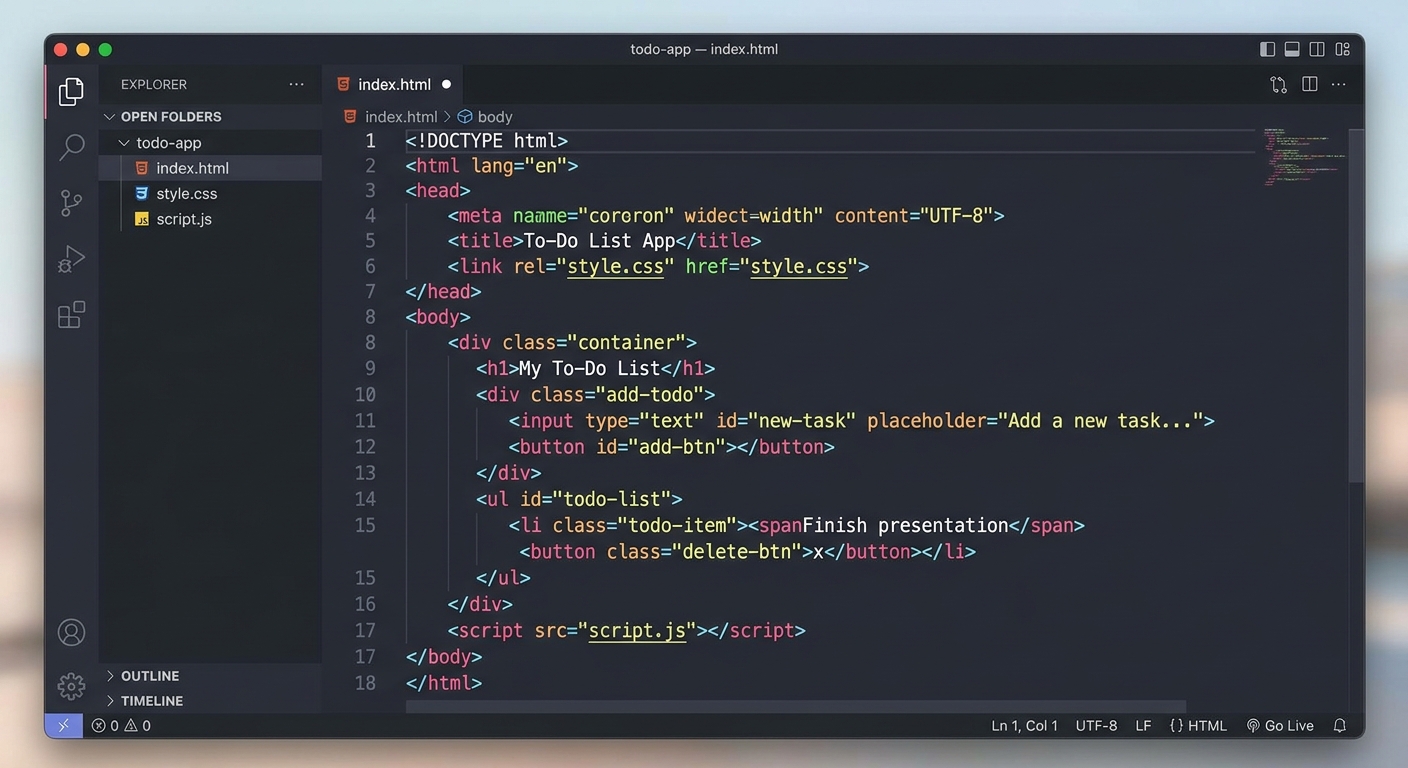
A screenshot of a code editor showing the basic HTML structure for a to-do list app, with the file explorer visible on the left.
Understanding the HTML Code:
: We create a wrapper block to hold our entire app so we can center it easily later.
and : These elements allow user interaction. We gave them unique id attributes (taskInput and addBtn) so our JavaScript can find them later.
and : These crucial tags connect our separate CSS and JS files to this main HTML file.Expected Output:
If you double-click index.html to open it in your browser right now, you will see a very plain, unstyled white page with a standard black title, a default text box, and a basic "Add Task" button.
---
Step 2: Styling the App with CSS
Right now, our application looks like it belongs in the early 1990s! CSS (Cascading Style Sheets) acts as the paint, interior design, and layout engine of our website. In our premier web development modules—widely rated among the best coding classes for kids in Mohali—we continually emphasize that a clean, modern user interface is what keeps people engaged with your software.
Open your style.css file and add the following styling code:

A screenshot showing the web browser with a beautifully styled, modern, centered white card on a light grey background containing the input and button.
Understanding the CSS Code:
Flexbox (display: flex): We use Flexbox heavily here. On the body, it centers our .container perfectly. Inside .input-section, it places the text box and the button neatly side-by-side.
Transitions (transition: all 0.2s): This makes color changes and hover effects smooth rather than instantaneous, giving the app a premium, high-quality feel.
Box Shadow (box-shadow): This adds a soft, blurred shadow behind our container, making it look like a physical card floating above the grey background.Expected Output:
Refresh your browser. Your application should now look like a professional, modern widget floating in the center of the page! However, clicking the "Add Task" button still does absolutely nothing. It is time to add the magic.
---
Step 3: JavaScript Variables & Event Listeners
JavaScript is the brain of your website. It controls the logic, the interactivity, and the data management. Parents looking for the best coding classes for kids in Chandigarh often ask us how we teach complex programming logic; the secret is breaking it down step-by-step, exactly like this.
Open your script.js file. First, we need to "grab" the HTML elements so our JavaScript code can communicate with them.

A screenshot of the JavaScript code highlighting the use of document.getElementById to select HTML elements.
Understanding the JS Initialization:
We use document.getElementById() to pull our input box, our button, and our empty
list into JavaScript as variables. Then, we use .addEventListener() to listen for two specific actions: a mouse click on the button, or the "Enter" key being pressed while typing in the box. Both of these actions will trigger a function called addTask().Expected Output:
Nothing visible changes on the screen yet. If you click the button right now, you will actually generate a silent error in the background because we haven't defined what the addTask function actually does. Let's fix that!
---
Step 4: The Core Logic - Adding and Deleting Tasks
This is the most critical step of the tutorial. We need to write the addTask function. This function will read what the user typed into the input field, create a brand new HTML list item () dynamically, and push it onto the screen.
This specific Document Object Model (DOM) manipulation technique is a core focus of the advanced STEM education programs we run.
Add this code directly below the code you wrote in Step 3:

A split screen showing the completed JavaScript function on one side, and the web browser displaying newly added tasks in the list on the other.
Understanding the Core Logic:
trim(): This method removes whitespace from both ends of a string. If a user accidentally just presses the spacebar five times and hits Enter, trim() catches it and our validation prevents a blank task from being added.
document.createElement('li'): Instead of writing HTML by hand, we are asking JavaScript to generate new HTML tags on the fly.
e.stopPropagation(): This is vital! Because the delete button sits inside the task item, clicking the delete button also technically clicks the task item itself. This "bubbles up" and causes the text to cross out as it deletes. stopPropagation() prevents the click event from bubbling up to the parent element.Expected Output:
Refresh your browser. Type "Buy groceries" and hit Enter. The task should instantly appear with a smooth hover effect! Click the text of the task—it should cross out and the border should turn green. Click the red 'X' button—the task should vanish.
You now have a fully functional, highly interactive Task Tracker!
---
🎉 Final Result & Next Steps
Congratulations! You have successfully built a dynamic Web Application from scratch using nothing but pure HTML, CSS, and vanilla JavaScript.
By completing this project, you have learned immensely valuable web development skills: structuring a document properly, styling modern UI elements with Flexbox, selecting DOM nodes, handling real-time user events (mouse clicks and keystrokes), and dynamically creating HTML elements through programming logic.
🚀 Challenge: Take It Further
Programming is all about continuous experimentation. To push your skills further, try adding these advanced features to your application:
- Prevent Duplicates: Modify your JavaScript logic so that if a user tries to add a task that already exists in the list, it shows an
alert() saying "Task already exists!" instead of adding a duplicate.
- Dynamic Task Counter: Add a small paragraph tag below the input box that automatically updates to show "Total Tasks: X" every time a task is added or deleted.
- Browser Local Storage (Advanced): In our intermediate classes at AI Valley, students take this app to the next level by integrating Browser Local Storage. Try researching
localStorage.setItem() and localStorage.getItem() so that when you refresh the web page, your list of tasks doesn't disappear!
🏫 Start Your Tech Journey at AI Valley
Did you enjoy building this interactive project? This is just the very beginning of what you can create!
AI Valley is proudly recognized as a top-rated premium coding and robotics education institute, serving ambitious students across Chandigarh, Mohali, Panchkula, and Zirakpur, as well as the broader Tricity area. Our expert instructors teach hands-on, portfolio-building projects just like this one every single week.
Whether your child is 7 years old and eager to build their first video game, or you are a young adult preparing for a computer science degree and a career in tech, we have the perfect, customized learning path for you. We provide the industry-standard hardware, the premium software, and the dedicated mentorship—you just need to bring your curiosity.
If you are serious about learning and want to elevate your skills, visit aivalley.co.in or Enroll at AI Valley today to book a free trial class at our campus and start your incredible journey into the world of technology!
Tags
web development course Panchkulabest coding classes for kids in PanchkulaSTEM education Tricitycoding institute near me PanchkulaAI classes for kids Zirakpur Chandigarh Mohalikids programming Panchkulajavascript tutorial tricity