
Build a Dynamic Movie Search App: Web Development Tutorial | AI Valley
Welcome to another exciting, hands-on tutorial from AI Valley! At our flagship campus in Panchkula, students build real-world tech projects just like this every single week. Whether you are an absolute beginner taking your first steps into programming or a hobbyist looking to sharpen your frontend skills, building functional web applications is the absolute best way to learn. Today, we are going to dive deep into frontend web development by creating a fully dynamic Movie Search Application that fetches live data from the internet.
Our expert instructors at AI Valley serve passionate learners across the entire Tricity area. This project is specifically designed to demystify how web browsers communicate with external databases—a foundational skill for modern software developers.
🎯 What You'll Build
By the end of this comprehensive tutorial, you will have built a sleek, modern Movie Search App. Users will be able to type the name of their favorite movie (like "Interstellar" or "The Matrix") into a search bar, click a button, and instantly see the movie's official poster, release year, director, IMDb rating, and a short plot summary.
This is exactly the kind of portfolio-ready project our students in Zirakpur, Chandigarh, and Mohali build during their weekend web development and software engineering bootcamps. If you've been searching for the best coding classes for kids in Mohali or comprehensive tech bootcamps for beginners, this tutorial will give you a perfect taste of our practical, results-driven curriculum. You'll master HTML structure, CSS styling, and JavaScript API fetching—all in one go!
📋 Prerequisites & Materials
To follow along with this tutorial, you don't need any complex software or paid tools. Everything we use in this guide is free and accessible to everyone.
- A Text Editor: We highly recommend [Visual Studio Code (VS Code)](https://code.visualstudio.com/), which is the industry standard for web developers.
- A Web Browser: Google Chrome, Firefox, Safari, or Edge to test your application.
- An API Key: We will be using the free OMDB (Open Movie Database) API to fetch our movie data.
- No initial hardware required! However, if you prefer a fully guided environment, feel free to visit AI Valley's Panchkula lab, where all materials, high-end computers, and hands-on guidance are provided for our offline students.
Let's get coding!
Step 1: Setting Up the HTML Skeleton
Every great web application starts with a solid foundation. In web development, HTML (HyperText Markup Language) acts as the skeleton of your web page. It defines the structure, telling the browser exactly where the text, input fields, and images will go.
Open VS Code, create a new folder on your computer called MovieApp, and inside it, create a file named index.html. Copy and paste the following HTML boilerplate into your new file.
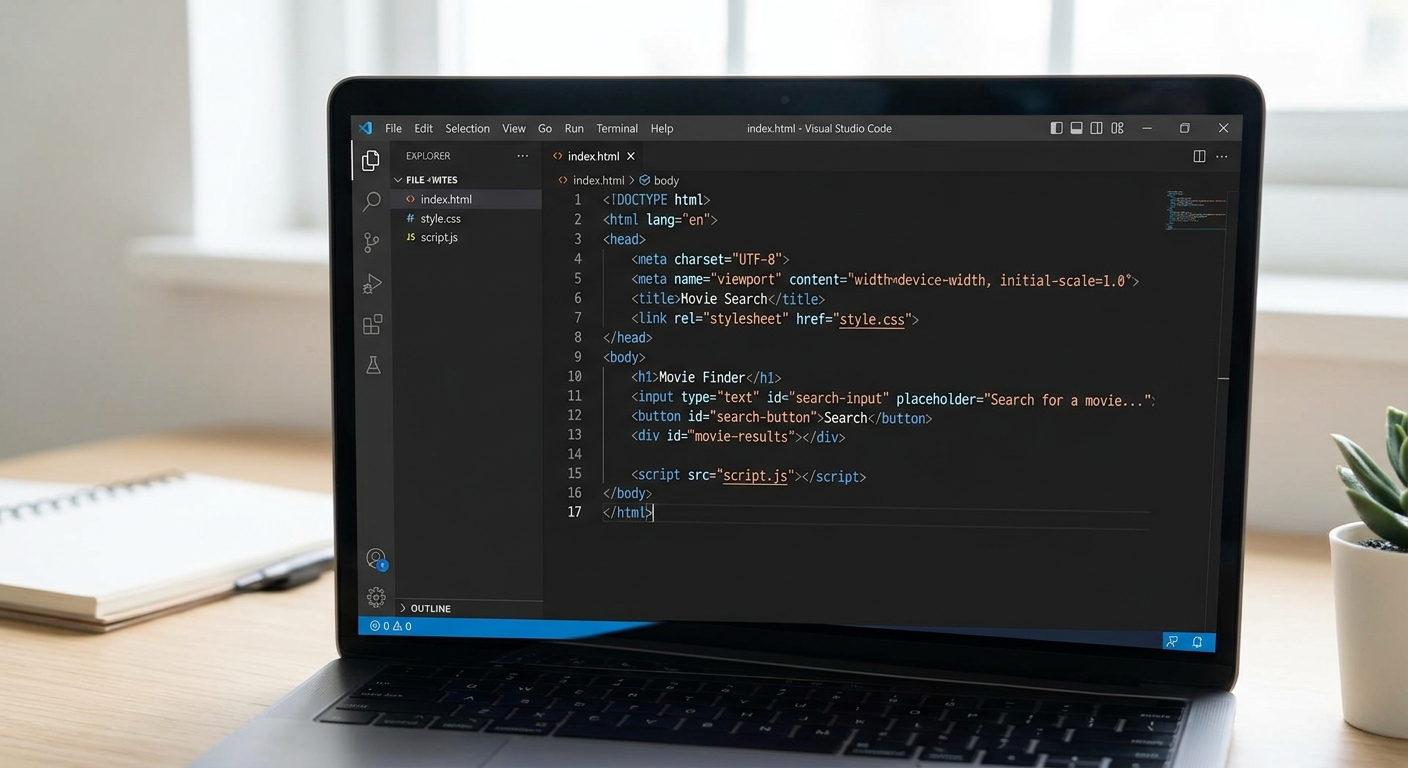
A screenshot of Visual Studio Code showing the index.html file with standard HTML boilerplate code and an empty body tag.
What this code does:
Here, we are setting up a standard HTML5 document. We create a When teaching our top-rated web development course Panchkula, we constantly emphasize the importance of IDs. Think of an ID ( Expected Output:
If you double-click Now that our structural skeleton is in place, it's time to add the skin and clothes. CSS (Cascading Style Sheets) is what transforms a boring document into a modern, colorful, and interactive application. Create a new file in the exact same folder named A split-screen showing the raw HTML output on the left and the beautifully styled dark-mode CSS output on the right. What this code does:
We use CSS Flexbox ( At AI Valley, parents frequently search for the best coding classes for kids in Zirakpur and neighboring cities because our curriculum emphasizes creative UI/UX design just as much as logical backend programming. The Expected Output:
Refresh your browser. Your application should now look like a professional, sleek, dark-themed web app. The search button should turn a slightly darker shade of blue and lift up slightly when you hover your mouse over it. Before we write our JavaScript logic, we need a way to access a database of movies. We will use a REST API (Application Programming Interface). Think of an API as a waiter in a restaurant. You (the frontend web app) give the waiter your order (the movie name), the waiter takes it to the kitchen (the OMDB database), and then brings back your food (the movie details like the poster and plot). A screenshot of the OMDB API website showing the free API key registration form. Security Note: Keep this key handy. In a production-level application, you would hide this key, but for a beginner frontend project running locally on your machine, it is perfectly safe to use directly in your code. We will need it for the next crucial step! Now comes the "brain" of our application. JavaScript will listen for the user's click, take the text from the input box, and ask the OMDB API for the corresponding movie data. Create a file named A visual diagram explaining how the JavaScript fetch function sends a request to the OMDB API and receives a JSON response. What this code does:
We are utilizing modern JavaScript features like This robust asynchronous logic is a staple in the projects our students build. If you've been searching for AI classes for kids Zirakpur, Chandigarh, Mohali, you'll love how APIs serve as the gateway to connecting simple applications to massive, intelligent global databases. Expected Output:
If you click search now, you'll see "Fetching movie data... 🍿", but because we haven't written the In this final coding step, we will take the structured JSON data provided by OMDB and dynamically inject it into our HTML page using a powerful JavaScript feature called Template Literals. Add this function to the very bottom of your A screenshot showing the JSON data format (key-value pairs like Title, Year, Poster) being transformed into a visual movie card on the app. What this code does:
This function receives the Connecting the invisible background logic to the visual frontend screen is the ultimate magic trick of web development. It's "Aha!" moments of realization exactly like this that make STEM education Tricity so incredibly rewarding for our students. Expected Output:
Save all your files and refresh the browser one last time. Type "The Matrix" (or your favorite film) and hit Search. You should immediately see a beautiful, smoothly animated card appear! It will contain the official movie poster, the director's name, the high IMDb rating, and a detailed plot description. Congratulations! You have successfully built a fully functional, live-data fetching Movie Search Application from scratch. By completing this tutorial, you haven't just mindlessly copied code; you have genuinely learned how the modern web operates. You've learned how to structure semantic HTML documents, style a modern user interface using CSS Flexbox, handle user click events with JavaScript, and reliably communicate with external REST APIs using asynchronous functions. If you've been looking for a premier coding institute near me Panchkula, you now know exactly what hands-on, practical learning feels like! Are you ready to test your newly acquired skills? Here are three ways to upgrade this project on your own: AI Valley is proudly rated as the premier coding and robotics institute, serving ambitious students across Chandigarh, Mohali, Panchkula, and Zirakpur. The Tricity tech community is growing rapidly, and we strongly believe that technology is best learned by doing. Our expert instructors guide students through immersive, hands-on projects—just like this Movie App—every single week. Whether you are searching for the best robotics institute Chandigarh Tricity for hands-on hardware experiences, or advanced Python and AI bootcamps for teens, we have the perfect customized learning path. From 5-year-old beginners exploring block coding to 17-year-old aspiring software engineers mastering full-stack development, everyone has a home here. Ready to transform your tech skills and build a portfolio of incredible projects? Visit aivalley.co.in today to Enroll at AI Valley, check out our state-of-the-art labs, and join our upcoming Tricity batches! Happy coding! field where the user will type the movie name, and a to trigger the search. Finally, we have an empty movie-results.id="movie-results") as a unique name tag. Our JavaScript code will look for this exact name tag later to know where to display the fetched movie details.index.html to open it in your web browser right now, you will see a very plain, unstyled webpage with a heading, an input box, and a button. It functions, but it lacks the visual appeal of a modern app. Let's fix that!Step 2: Styling the App with CSS
style.css and add the following styling rules.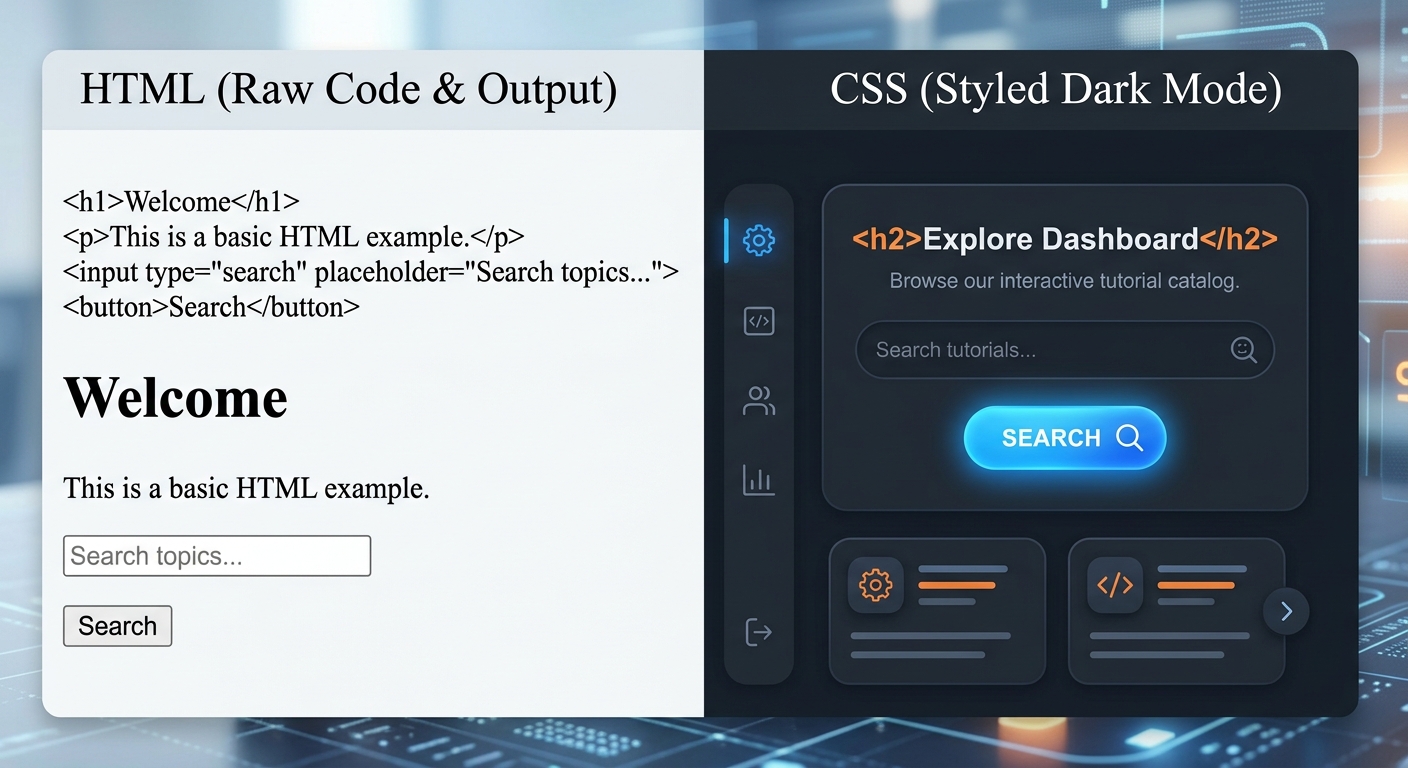
display: flex, justify-content: center) to perfectly center our application on the screen and line up our input field and button horizontally. We've chosen a cinematic dark theme (#121212), which is easy on the eyes and fits the movie theme perfectly.@keyframes rule at the bottom adds a smooth fade-in animation, ensuring that when the movie data appears on the screen, it does so gracefully rather than popping in abruptly.Step 3: Getting Your Free OMDB API Key
ab12c34d).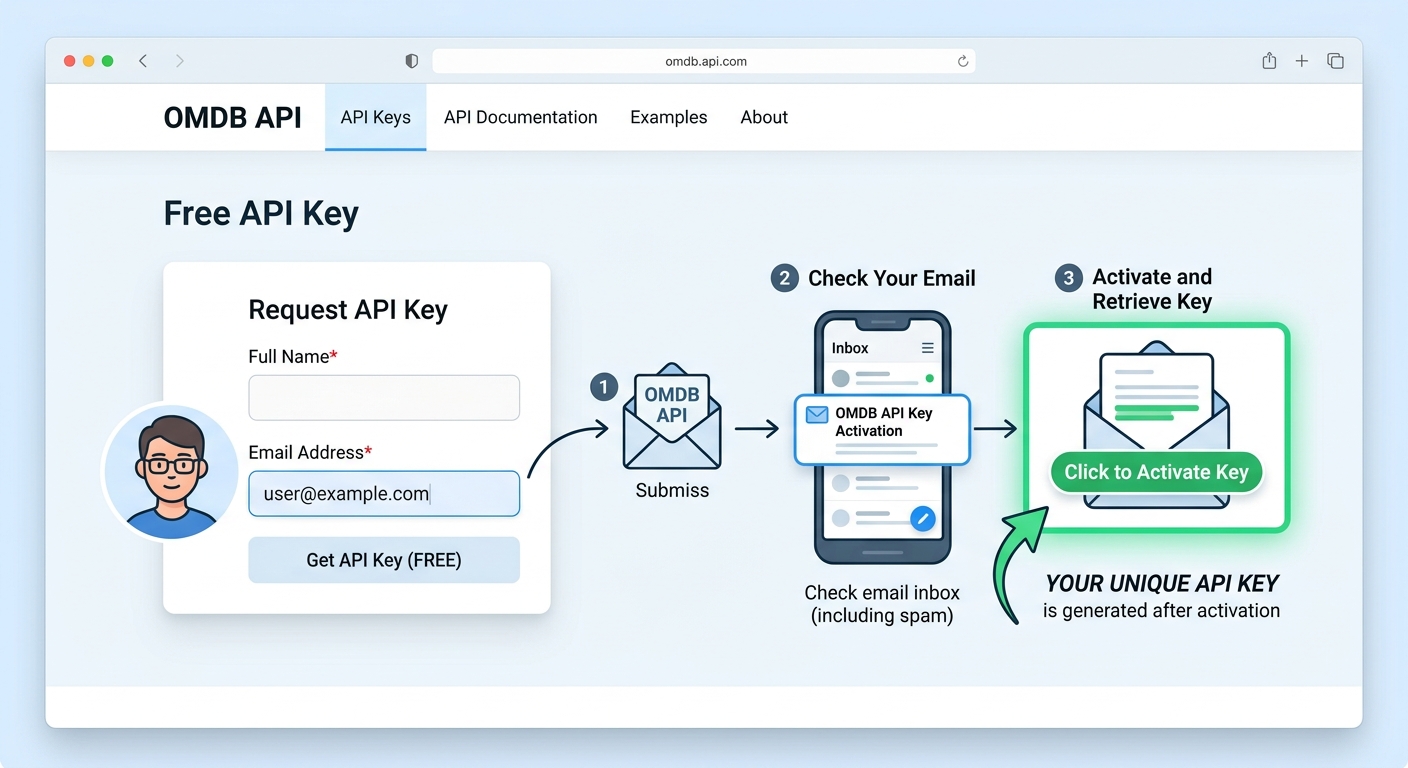
Step 4: Writing the JavaScript Logic (Fetching Data)
script.js in your folder and add the following code. Remember to replace 'YOUR_API_KEY_HERE' with the actual 8-character key you received in Step 3!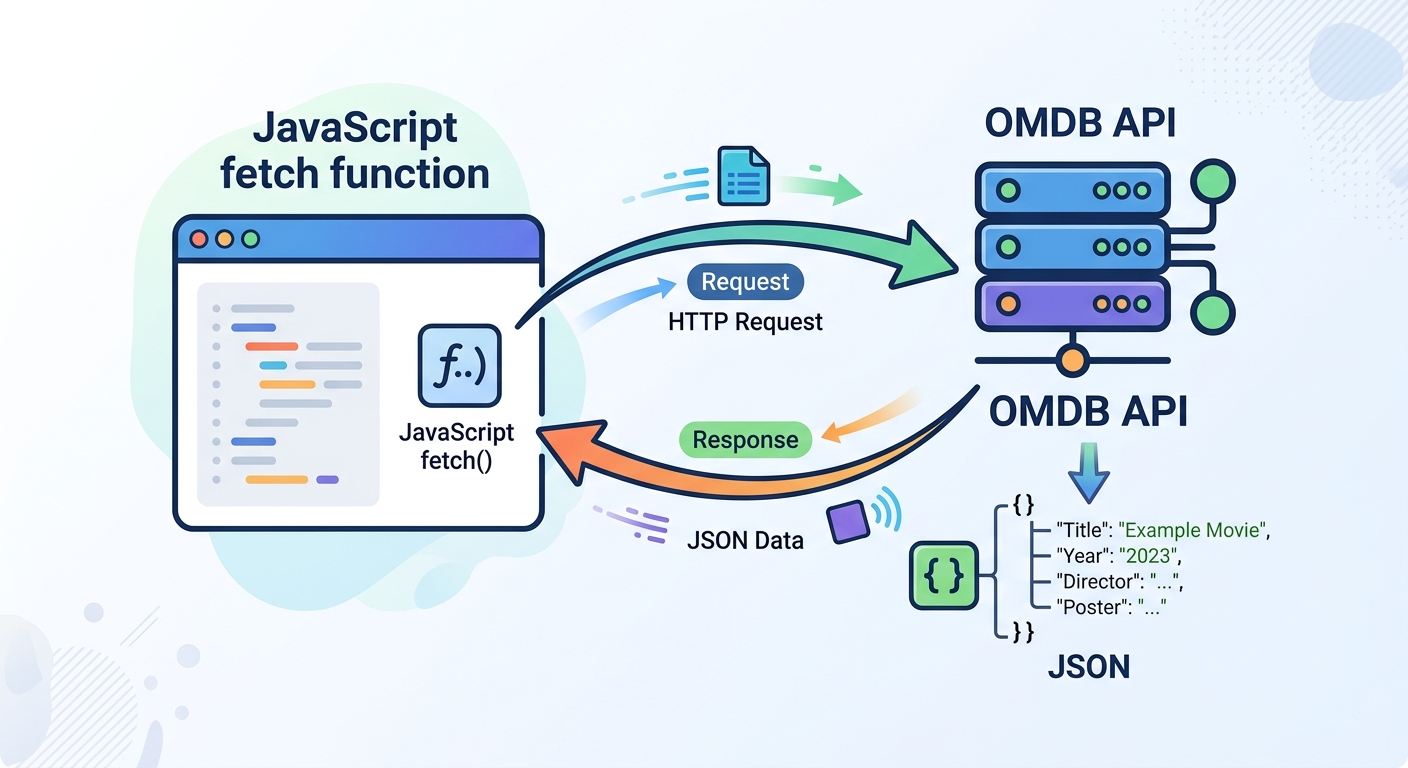
async and await. Because fetching data from the internet takes a fraction of a second, await tells our code to politely pause and wait for the OMDB server to reply before moving on to the next line. We also wrap our fetch request in a try...catch block. This ensures that if the user's internet drops, the app won't crash—it will display a friendly error message instead.displayMovie function yet, nothing else will happen. Let's fix that in our final step!Step 5: Displaying the Movie Data on Screen
script.js file: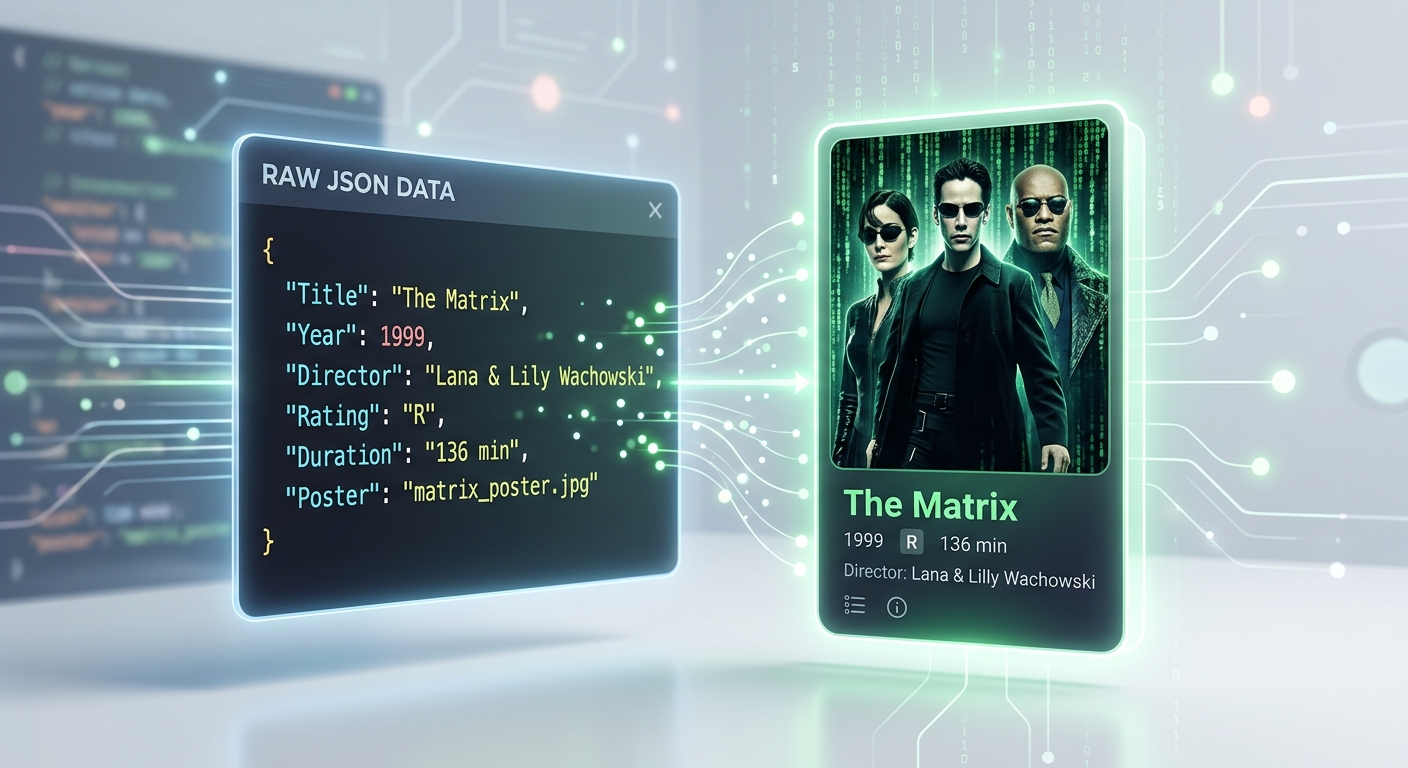
movie object from our successful API call. It uses resultsContainer.innerHTML to completely wipe the "Fetching..." text and replace it with a brand new, dynamically generated HTML block. We extract specific properties exactly as the OMDB API formats them, such as movie.Title, movie.Year, and movie.imdbRating.🎉 Final Result
🚀 Challenge: Take It Further
script.js file to listen for the "Enter" key press inside the input field to trigger the search automatically.localStorage. Try adding a "Save to Favorites" button that saves the movie title to a persistent list at the bottom of the page that survives even when the browser is refreshed!🏫 Learn More at AI Valley
Tags